HomeTurtlegraficsGPanelRoboticsGameGrid WebTigerPython
 Python - Online
mbrobot
Deutsch   English   Français   

MBROBOT ( MAQUEEN)


The micro:bit is a programmable computer. It consists of a 4 x 5 cm circuit board with a 32-bit microcontroller, flash memory, 25 red LEDs, two buttons, several sensors and a USB interface. Together with the simple Maqueen chassis, it becomes a moving robot and offers an inexpensive alternative to the LEGO EV3 robot.

All examples in this tutorial can be realised with four different Maqueen models: Maqueen lite, Maqueen Plus, Maqueen Plus V2 and Maqueen Plus V3. The programmes differ in the import line, as the Python modules matching the hardware must be imported.

The standard kits can be used to demonstrate the most important programming concepts of robotics. In addition, servomotor-controlled components (Maqueen Mechanic), can be obtained, which enable further interesting applications.


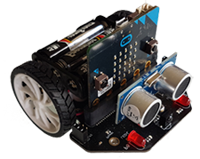
MAQUEEN Lite (mbRobot)

The cheapest model. In addition to the motors and two red LEDs, it has an ultrasonic sensor (distance sensor) and two infrared sensors that can distinguish between light and dark surfaces. The latest Maqueen 4 model also has ports S1 and S2 to which servo motors can be connected.

Module import from mbrobot import *


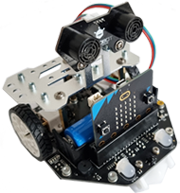
MAQUEEN PLUS (mbRobot_Plus)

This robot is slightly wider and heavier. It also has multi-coloured LEDs, 6 intrarot sensors, loudspeakers, three servo ports and several I2C interfaces. The metal frame is well suited for attaching additional components.

Module import: from mbrobot_plus import *


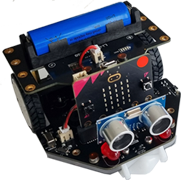
MAQUEEN PLUS V2 (mbRobot_PlusV2)

This robot is more compact than the Plus model and is easier to control. The LEDs only light up red, but it has 4 neopixels at the bottom of the chassis that light up in different colours. Servo ports, I2C interfaces and other PIN connections are the same as on the Plus model.

Module import: from mbrobot_plusV2 import *


MAQUEEN PLUS V3 (mbRobot_PlusV3)

The latest model, Maqueen Plus V3, is a robot for advanced users. However, you can also use V3 to complete all the examples and tasks in this course. In addition, V3 features:
- Matrix laser distance sensor (LIDAR)
- PID control of the motors
- Light sensor (measurement of ambient brightness)
- Integrated cross detection and line tracking.

Modulimport: from mbrobot_plusV3 import *


SIMULATION

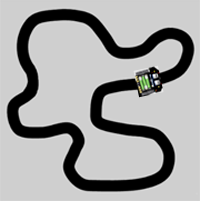
Many examples and exercises in this tutorial can also be run in simulation mode. This is particularly useful if you want to test your program quickly or if you do not have a robot available.


Our learning programme uses the web-based Python editor WebTigerPython and provides you with many executable sample examples and tasks to solve yourself. We assume that you already know the basic programme structures. Otherwise we recommend that you first work through a few chapters from the Turtlegraphics tutorial or Python crash cours with micro:bit..

However, the online version does not completely replace the locally installed TigerJython development environment. This also has a robot simulation and some additional tools. However, the programme codes are compatible. The programmes created online can be further processed with TigerJython without any problems. You can find a learning programme on robotics with mbRobot using TigerJython at tigerjython4kids.ch/mbrobot.