| HomeTurtlegraficsGPanelRoboticsGameGrid WebTigerPython |
| Python - Online |
| Deutsch English |
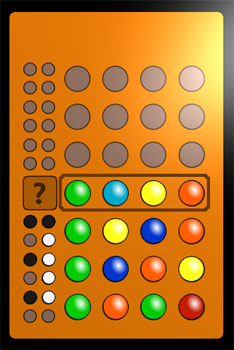
MASTERMIND

GAME DESCRIPTION |

Program: from gamegrid import * import random def showTips(whitePegs, blackPegs): for i in range(4): ep = Actor(True, "sprites/evalpeg.png", 2) if blackPegs > 0: ep.show(0) addActor(ep, Location(1, currentRow)) ep.turn(90 * i) blackPegs -= 1 elif whitePegs > 0: ep.show(1) addActor(ep, Location(1, currentRow)) ep.turn(90 * i) whitePegs -= 1 def finishRound(): removeActor(marker) x = 2 for spriteNr in secretCode: peg = Actor("sprites/peg.png", 6) peg.show(spriteNr) addActor(peg, Location(x, 1)) x += 1 def evaluateGuess(guess): global currentRow, placedPegs blackPegs = 0 whitePegs = 0 for i in range(4): if guess[i] == secretCode[i]: blackPegs += 1 alreadyProcessed = [] for color in secretCode: for j in range(4): if color == guess[j] and not j in alreadyProcessed: alreadyProcessed.append(j) whitePegs += 1 break whitePegs = whitePegs - blackPegs showTips(whitePegs, blackPegs) if blackPegs == 4: setStatusText("Correct!") finishRound() else: currentRow -= 1 if currentRow == 1: finishRound() marker.setLocation(Location(1, currentRow)) placedPegs = 0 removeActor(evaluateBtn) def pressCallback(e): global placedPegs global evaluateBtn loc = toLocationInGrid(e.getX(), e.getY()) if placedPegs == 4 and loc.x == 1 and loc.y == currentRow: guess = [0] * 4 for i in range(4): guess[i] = getOneActorAt(Location(2 + i, currentRow)).getIdVisible() evaluateGuess(guess) if loc.y == currentRow and loc.x > 1 and loc.x < 6: if getOneActorAt(loc) == None: addActor(Actor("sprites/peg.png", 6), loc) placedPegs += 1 if placedPegs == 4: evaluateBtn = Actor("sprites/evalbutton.png") addActor(evaluateBtn, Location(1, currentRow)) else: getOneActorAt(loc).showNextSprite() refresh() return True # ---------------- main ---------------------- makeGameGrid(7, 10, 60, None, "sprites/mastermindbg.png", False, mousePressed = pressCallback) setTitle("Mastermind") placedPegs = 0 currentRow = 8 secretCode = [0] * 4 for i in range(4): secretCode[i] = random.randint(0, 5) marker = Actor("sprites/rowmarker.png") addActor(marker, Location(1, currentRow)) show() doRun() |
Explanations of the programme code |
|
 |
 |
 |