HomeTurtlegraficsGPanelRoboticsGameGrid WebTigerPython
 Python - Online
bewegen
Deutsch   English   

3. MOVE ACTORS


YOU LEARN HERE...


to give the actors a dynamic ‘life of their own’. As soon as the doRun() function is called, a simulation cycle starts in which the act() method is called periodically.


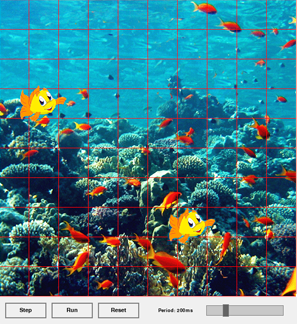
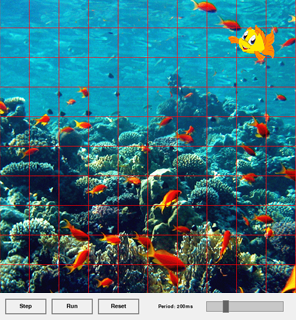
The basic concept of GameGrid is to give the actors a dynamic ‘life of their own’. As soon as the Run button is pressed in the navigation bar or the doRun() function is called, a simulation cycle starts in which the act() method is called periodically. The simulation period (speed) can be changed using the slider.

By clicking on Step, you can run the movement step by step; by clicking on Reset, you can restart the simulation.


EXAMPLES


Example1: The fish should swim forth and back
 

The act() method is defined in the Fish class, so it must have the parameter self. All methods must be called with self. With move(), the fish moves to the next cell in each simulation period (200 milliseconds).

If the fish is at the right or left edge, it reverses its direction of movement by 180°. You can change the speed of movement using the slider in the navigation bar. If there are several objects of the Fish class, they all move according to the specifications in the act() method.


Program:

# Gg3.py
from gamegrid import *

# -------------- class Fish -----------------------------
class Fish(Actor):
    def __init__(self):
        Actor.__init__(self, "sprites/nemo.gif")
    def act(self):
        self.move()
        if (self.getX()== 9) or (self.getX() == 0):
            self.turn(180)
 
# ----------------- main ---------------------------------
makeGameGrid(10, 10, 60, Color.red, "sprites/reef.gif")
nemo = Fish()
addActor(nemo, Location(1, 3))
wanda = Fish()
addActor(wanda, Location(6, 7))
show()
doRun()
► Copy to clipboard

Examplel 2: Here, too, the fish should swim back and forth and rotate its image by 180° at the edge of the game window.

In contrast to the previous example, however, it should always swim forwards, i.e. mirror its sprite image at the right edge of the window and cancel the mirroring at the left edge of the window.

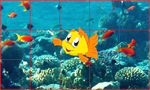
The setHorzMirror(True) method can be used to mirror a sprite image. In cell 9, the image is mirrored, and in cell 0, the mirroring is cancelled with setHorzMirror(False).


Program:

# Gg3a.py
from gamegrid import *

# --------------- class Fish ----------------------------
class Fish(Actor):
    def __init__(self):
        Actor.__init__(self, "sprites/nemo.gif")
    def act(self):
        self.move()
        if self.getX()== 9: 
            self.turn(180)
            self.setHorzMirror(True)
        if self.getX()== 0:
            self.turn(180) 
            self.setHorzMirror(False)

# ------------------- main ---------------------------------
makeGameGrid(10, 10, 60, Color.red, "sprites/reef.gif")
nemo = Fish()
addActor(nemo, Location(1, 3))
show()
doRun()
► Copy to clipboard

Example 3: The fish should pass through all cells

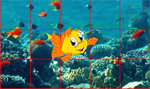
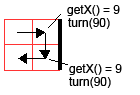
The fish starts in cell (0, 0). When it reaches the cell with x-coordinate 9, it turns 90°. Since x is still 9 after the next step, it has to turn again. At the left edge, it has to turn 270° each time.


Program:

# Gg3b.py
from gamegrid import *

# --------------- class Fish ----------------------------
class Fish(Actor):
    def __init__(self):
        Actor.__init__(self, "sprites/nemo.gif")
    def act(self):
        self.move()
        if self.getX()== 9: 
            self.turn(90)
            self.setHorzMirror(True)
        if self.getX()== 0:
            self.turn(270) 
            self.setHorzMirror(False)

# ------------------- main ---------------------------------
makeGameGrid(10, 10, 60, Color.red, "sprites/reef.gif")
nemo = Fish()
addActor(nemo, Location(0, 0))
show()
doRun()
► Copy to clipboard


REMEMBER YOU...


To move the actors in the game window, use the following methods:

move() moves the actor to the next cell
turn(180) changes the direction of movement by 180°
getX() returns the x-coordinate
setHorzMirror(True) shows the mirror image of the actor
setHorzMirror(False) shows the original image of the sprite
isMoveValid() returns True if the actor can move to the next cell, i.e. is not at the edge

For these methods to be called automatically, they must be in the act() method.


TO SOLVE BY YOURSELF


1.

A Pacman is created at position (0, 0) in a game window. Program the following movements:
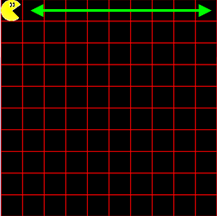
a) Pacman moves from cell to cell from left to right and back.  

b)

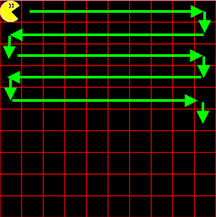
Pacman starts in cell (0, 0) and moves from cell to cell so that he traverses the entire playing field.


c)

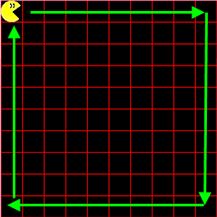
Pacman moves on a square. At the edge, he turns 90° and continues his movement.

To check whether Pacman is at the edge, use the isMoveValid() method. This returns True if the actor can move to the next cell, i.e. is not at the edge.
If the condition If not self.isMoveValid() is met, he is at the edge and must turn.


2.

Complete task b) so that the Pacman sprite image is mirrored at the end of each line.

3.

Complete task b) so that Pacman jumps back to the first cell (0, 0) each time he reaches the last cell (9, 9). To do this, use the command
self.setLocation(Location(0, 0))
 

or the commands

self.setX(0)
self.setY(0)
sets the actor in the cell with the coordinate 0