mausevents
Deutsch   English   

8. MOUSE EVENTS


YOU LEARN HERE...


how to trigger mouse-controlled actions with mouse events. These are very important in interactive games. In so-called callback functions (or callbacks for short), you define what should happen when a mouse button is pressed, released or the mouse is moved. The callbacks are not called by your own programme, but automatically by the system when the mouse button is pressed.


EXAMPLES


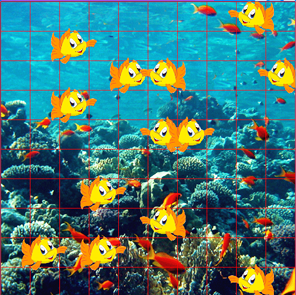
Example 1: Pressing the mouse button creates a new fish
 

The callback function pressCallback() is defined as a global function. When the mouse button is pressed, e.getX() und e.getY() register the coordinates of the mouse click and create an object of the Fish class at this position.

The callback is registered as a parameter when the game window is created.

This is a nice example of object-oriented programming, because each new fish is an instance of the Fish class and ‘knows’ how to move.


Program:

# Gg8.py
from gamegrid import *

# ---------------- class Fish ----------------
class Fish(Actor):
    def __init__(self):
        Actor.__init__(self, "sprites/nemo.gif");
     
    def act(self):
        self.move()
        if not self.isMoveValid():
            self.turn(180)
            self.setHorzMirror(not self.isHorzMirror())
            
# ---------------- main ----------------------
def pressCallback(e):
    location = toLocation(e.getX(), e.getY())
    addActor(Fish(), location)

makeGameGrid(10, 10, 60, Color.red, "sprites/reef.gif", False, 
     mousePressed = pressCallback)
show()
doRun()
► Copy to clipboard

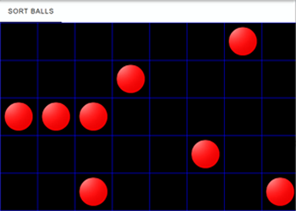
Example 2: Move balls with the mouse button pressed

Arrange the balls in a row. When dragged with the mouse button pressed, the game pieces move jumpingly from cell to cell. You use two callbacks, pressCallback() and dragCallback().
The pressCallback() function records the position of the mouse click and stores the actor located in that cell in the actor variable.
dragCallback() moves the actor while the mouse button is pressed.


Since the actor variable is used in both functions, it must be declared as global. The two callback functions are registered when the game window is created.

Program:

# Gg8a.py
from gamegrid import *

def pressCallback(e):
    global actor 
    location = toLocationInGrid(e.getX(), e.getY())    
    actor = getOneActorAt(location)
 
def dragCallback(e):
    if actor == None:
        return
    location = toLocationInGrid(e.getX(), e.getY())
    actor.setLocation(location) 


makeGameGrid(8, 5, 80, Color.blue, False,  mousePressed = pressCallback, 
             mouseDragged = dragCallback)
setTitle("Sort Balls")
for i in range(8):
    ball = Actor("sprites/token_1.png")
    addActor(ball, getRandomEmptyLocation())
show()
doRun()
► Copy to clipboard

Beispiel 3: Moving objects continuously
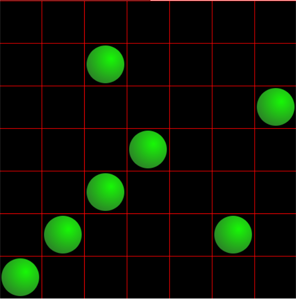
In example 2, the game piece moves abruptly from cell to cell when dragged with the mouse button pressed. Sometimes it is more elegant to drag the objects continuously and position them exactly in a grid cell when the mouse button is released. Seven balls are randomly distributed in the game window at the beginning. They should be moved with the mouse to the seven fields that lie diagonally.

You use three callbacks: pressCallback() , dragCallback() and releaseCallback(). In presCallback() , the position of the mouse click and the ball located at that position are recorded. The method setLocationOffset() in dragCallback() causes continuous movement while dragging with the mouse button pressed. In releaseCallback() , the ball is positioned in the centre of cell when the mouse button is released..
To make the variables actor and startLoc usable in multiple callbacks, you must declare them as global.
 

Program:

#Gg8b.py
from gamegrid import *

def pressCallback(e):
    global actor, startLoc
    startLoc = toLocationInGrid(e.getX(), e.getY())
    actor = getOneActorAt(startLoc)
 
def dragCallback(e):
    if actor == None:
        return
    startPoint = toPoint(startLoc)
    actor.setLocationOffset(e.getX()-startPoint.x,e.getY()-startPoint.y) 

def releaseCallback(e):
    if actor == None:
        return
    destLoc = toLocationInGrid(e.getX(), e.getY())
    actor.setLocationOffset(0, 0)
    actor.setLocation(destLoc)    

makeGameGrid(7, 7, 70, Color.red, False,  mousePressed = pressCallback, 
          mouseDragged = dragCallback, mouseReleased = releaseCallback)
setTitle("Sort Balls")
for i in range(7):
    ball = Actor("sprites/marble.png")
    addActor(ball, getRandomEmptyLocation())
actor = None
startLoc = None    
show()
doRun()
► Copy to clipboard


REMEMBER YOU...


In the callback functions, you define what should happen when the user presses the mouse button, moves the mouse with the mouse button pressed, or releases the mouse button. These functions are registered when the game window is created and are called directly by the system, not by the programme.


TO SOLVE BY YOURSELF


1.

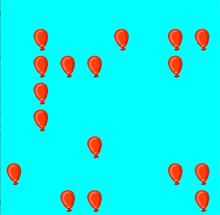
In the game window with a blue background, 20 balloons are generated at randomly selected positions (balloon.gif). They can be destroyed with a click of the mouse..  
 

2.
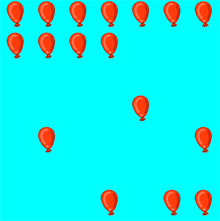
As in the first task, 20 balloons are generated at randomly selected positions. Define a callback function pressCallback(e) that allows you to select a balloon with the mouse and a callback function dragCallback(e) that allows you to move the selected balloon. Then move all balloons so that  


3.

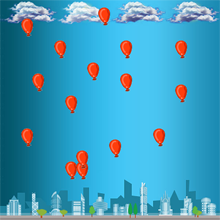
Create a game window with 20 horizontal and 20 vertical cells of size 30, with the background image ‘sprites/town.jpg’. Balloons are created at the mouse position when the mouse is clicked. These should move downwards.

In the Balloon class, you define a function act(self) in which the direction of movement is set with self.setDirection(90).