lightsout
Deutsch   English   

LIGHTS OUT GAME


GAME DESCRIPTION


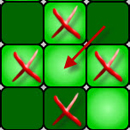
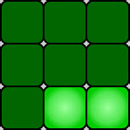
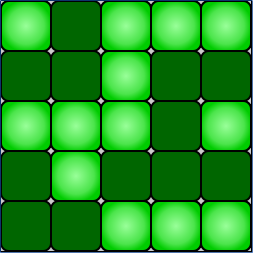
The game consists of 25 lamps arranged in a 5 x 5 grid. At the start of the game, all lamps are switched on. When you click on a lamp, it and the 4 neighbouring lamps are ‘inverted’, e.g.:


The aim of the game is to switch off all the lamps

Program:

# LightsOut.py
from gamegrid import *
            
def pressCallback(e):
     loc = toLocationInGrid(e.getX(), e.getY())
     locs  = [0] * 5
     locs[0] = Location(loc.x, loc.y)
     locs[1] = Location(loc.x, loc.y - 1)
     locs[2] = Location(loc.x, loc.y + 1)
     locs[3] = Location(loc.x - 1, loc.y)
     locs[4] = Location(loc.x + 1, loc.y)
 
     for i in range(5):
         a = getOneActorAt(locs[i])
         if a != None:
              a.showNextSprite()
     refresh()
     return True    

makeGameGrid(5, 5, 50, Color.black, False, 
     mousePressed = pressCallback)
setTitle("LightsOut")
for i in range(5):
     for k in range(5):
          lamp = Actor("sprites/lightout.gif", 2)
          addActor(lamp, Location(i, k))
          lamp.show(1)     
show()
doRun()
► Copy to clipboard


Explanations of the programme code

 
1. The game window consists of 5 rows and 5 columns. First, we create a switched-on lamp in each of the 25 cells (lamp.show(1)

2. In the callback function pressCallback(), the location loc of the mouseclick is first determined. This has the coordinates x, y.

3.
Then a list with the locations of the 5 affected lamps is created:
locs = [0] * 5
creates a list with 5 elements (locations).
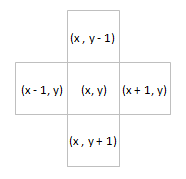
The locations of the neighbouring cells are determined according to the sketch on the right.
 
4. Finally, the affected lamps are inverted with showNextSprite() invertiert.
Since some neighbouring cells are outside the game window when clicking in the edge cells,
if a != None:
Check whether a lamp exists in this cell.

5. refresch() Since we are not starting an animation, we must update the game situation after each click.