| Deutsch English |
YOU LEARN HERE... |
that interaction between game characters is extremely important in game programming. Collisions in grids allow you to check whether multiple actors are located in the same grid cell. The getActorsAt() method returns all actors located in a specific cell in a list. If there is only one actor or no actor in a cell, you can use the getOneActorAt() method, which returns the actor or None if there is no actor in the cell. |
EXAMPLES |
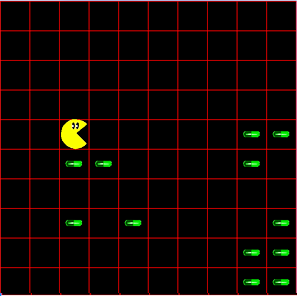
| Example1: Pacman eats pills |
Program: # Gg5.py from gamegrid import * # ------------- class Pacman -------------------------- class Pacman(Actor): def __init__(self): Actor.__init__(self, "sprites/pacman.gif", 2) def act(self): self.move() self.tryToEat() self.showNextSprite() if self.getX() == 9: self.turn(90) self.setHorzMirror(True) if self.getX() == 0: self.turn(270) self.setHorzMirror(False) def tryToEat(self): self.show(0) actor = getOneActorAt(self.getLocation(), Pill) if actor != None: actor.hide() self.show(1) # ------------- class Pill --------------------------- class Pill(Actor): def __init__(self): Actor.__init__(self, "sprites/pill_0.gif") # ---------------- main ------------------------------ makeGameGrid(10, 10, 60, Color.red, False) paki = Pacman() addActor(paki, Location(0, 0)) for i in range(20): addActor(Pill(), getRandomEmptyLocation()) show() doRun() |
REMEMBER YOU... |
| With actor = getOneActorAt(self.getLocation, Pill), you can check whether there is a pill at the current position. If so (if (actor != None): returns True), you can make it disappear with actor.hide(). |
TO SOLVE BY YOURSELF |
|
 |
 |
 |