| Deutsch English |
YOU LEARN HERE... |
how to use the keyboard to control the game characters. |
In so-called callback functions, you define what should happen when a key on the keyboard is pressed or released. These functions are not called by the programme, but automatically by the system when a key is pressed. The callback functions are registered with the named parameters keyPressed or keyReleased in makeGamegrid() . You can use the getKeyCode() function to determine the numerical code of the pressed key. |
EXAMPLES |
| Example1: Controlling Pacman with the cursor keys |
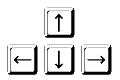
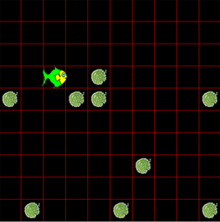
The callback function keyCallback(e) defines what should happen when a cursor key is pressed. The callback function receives the parameter e, from which you can determine the code of the pressed key with getKeyCode(). For the cursor keys, these are the number codes 37, 38, 39 and 40.
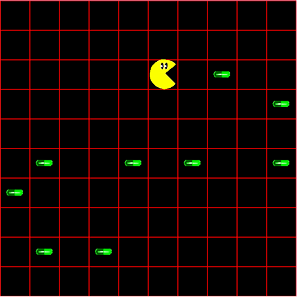
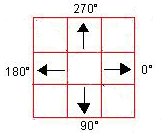
Program: # Gg6.py from gamegrid import * # --------------------- class Pacman --------------------- class Pacman(Actor): def __init__(self): Actor.__init__(self, True, "sprites/pacman.gif", 2); def tryToEat(self): self.show(0) actor = getOneActorAt(self.getLocation(), Pill); if (actor != None): actor.hide() self.show(1) # --------------------- class Pill --------------------- class Pill(Actor): def __init__(self): Actor.__init__(self, "sprites/pill_0.gif"); def keyCallback(e): keyCode = e.getKeyCode() if keyCode == 37: # left paki.setDirection(180) elif keyCode == 38: # up paki.setDirection(270) elif keyCode == 39: # right paki.setDirection(0) elif keyCode == 40: # down paki.setDirection(90) paki.move() paki.tryToEat() makeGameGrid(10, 10, 60, Color.red, False, keyPressed = keyCallback) paki = Pacman() addActor(paki, Location(0,0)) for i in range(10): addActor(Pill(), getRandomEmptyLocation()) show() doRun() |
REMEMBER YOU... |
| The callback function keyCallback(e) is called by the system when a key is pressed. It is registered with the parameter keyPressed in makeGamegrid(). You can use getKeyCode() to determine the code of the key that was pressed. For the cursor keys, the number codes are 37, 38, 39 and 40. |
TO SOLVE BY YOURSELF |
|
 |
 |
 |