| Deutsch English |
STRATEGY IN THE MAZE |
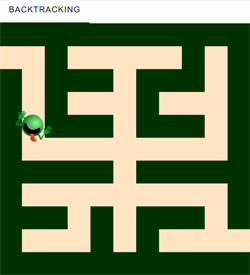
In your programme, you determine the neighbouring nodes by selecting those of the 4 adjacent cells that are not on the wall and not outside the grid.. Program: #Labyrinth.py from gamegrid import * def createMaze(): global maze maze = GGMaze(11, 11) for x in range(11): for y in range(11): loc = Location(x, y) if maze.isWall(loc): getBg().fillCell(loc, Color(0, 50, 0)) else: getBg().fillCell(loc, Color(255, 228, 196)) refresh() def getNeighbours(node): neighbours = [] for loc in node.getNeighbourLocations(0.5): if isInGrid(loc) and not maze.isWall(loc): neighbours.append(loc) return neighbours def search(node): global targetFound, manual if targetFound: return visited.append(node) # push alien.setLocation(node) refresh() delay(500) # Check for termination if node == exitLocation: targetFound = True for neighbour in getNeighbours(node): if neighbour not in visited: backSteps = [node] backStepsList.append(backSteps) backSteps.append(neighbour) search(neighbour) # recursive call backSteps.reverse() if not targetFound: for loc in backSteps[1:]: setTitle("Must go back...") alien.setLocation(loc) refresh() delay(500) if manual: setTitle("Went back...") else: setTitle("Went back. Find target...") backStepsList.pop() visited.pop() # pop manual = True targetFound = False visited = [] backStepsList = [] makeGameGrid(11, 11, 40, False) setTitle("Labyrinth") show() createMaze() startLocation = maze.getStartLocation() exitLocation = maze.getExitLocation() alien = Actor("sprites/alieng.png") addActor(alien, startLocation) search(startLocation) setTitle("Target found") |
REMEMBER YOU... |
It is interesting to compare the solution strategy of humans with that of computers. A human player recognises the overall situation at a glance and derives a strategy from it on how to reach the exit as quickly as possible. In doing so, they act with a global overview that is typical for humans, but which your computer programme lacks. The computer only captures the current situation locally, but ‘remembers’ the paths already taken very precisely and searches very systematically for new paths to the goal. However, the situation changes in favour of the computer if the human being is denied the global overview, e.g. if he finds himself inside the maze, or if the number of cells is significantly increased. |
8 QUEENS PROBLEM |
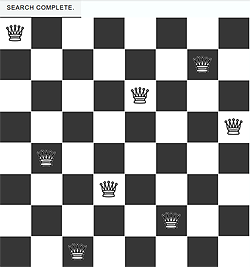
Your algorithm stops when it finds the first solution (there are 92 different solutions). Depending on the performance of your computer (or web editor), you may have to wait a few seconds to a few minutes for a solution to be found. Program: #Quenns.py from gamegrid import * n = 8 # number of queens def getNeighbours(node): squares = [] # list of occupied squares for i in range(n): if node[i] != -1: squares.append(Location(node[i], i)) forbidden = [] # list of forbidden squares for location in squares: a = location.x b = location.y for x in range(n): forbidden.append(Location(x, b)) # same row for y in range(n): forbidden.append(Location(a, y)) # same column for loc in getDiagonalLocations(location, True):#diagonal up forbidden.append(loc) for loc in getDiagonalLocations(location, False):#diagonal down forbidden.append(loc) allowed = [] # list of all allowed squares = all - forbidden for i in range(n): for k in range(n): loc = Location(i, k) if not loc in forbidden: allowed.append(loc) neighbourNodes = [] for loc in allowed: neighbourNode = node[:] i = loc.y # row k = loc.x # col neighbourNode[i] = k neighbourNodes.append(neighbourNode) return neighbourNodes def search(node): global found if found or isDisposed(): return visited.append(node) # node marked as visited # Check for solution if not -1 in node: found = True drawNode(node) for s in getNeighbours(node): search(s) visited.pop() def drawBoard(): for i in range(n): for k in range(n): if (i + k) % 2 == 0: getBg().fillCell(Location(i, k), Color.white) def drawNode(node): removeAllActors() for i in range(n): addActorNoRefresh(Actor("sprites/chesswhite_1.png"), Location(node[i],i)) refresh() makeGameGrid(n, n, 600 // n, False) setBgColor(Color.darkGray) drawBoard() show() setTitle("Searching. Please wait..." ) visited = [] found = False startNode = [-1] * n # all squares empty search(startNode) setTitle("Search complete. ") |
 |
 |
 |