| Deutsch English |
YOU LEARN HERE... |
how to create game characters (actors) in the game window and assign them an image. |
All game characters are treated as objects of a class derived from the Actor class. Each actor is assigned a sprite image. However, an actor can also have multiple sprites. A class has a special method called a constructor. Constructors in Python are always defined with def __init__(self). The class definition always comes before the main block. |
EXAMPLES |
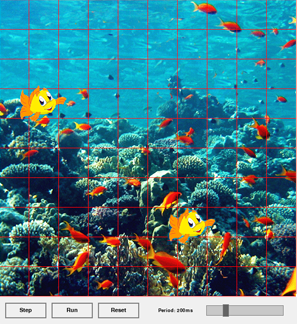
Program: # Gg2.py from gamegrid import * # ------------- class Fish ------------------------------- class Fish(Actor): def __init__(self): Actor.__init__(self, "sprites/nemo.gif") # ---------------- main ---------------------------------- makeGameGrid(10, 10, 60, Color.red, "sprites/reef.gif") nemo = Fish() addActor(nemo, Location(1, 3)) wanda = Fish() addActor(wanda, Location(6, 7)) show() You can also create several actors of the Fish class without naming them individually. Then call the class name Fish() in the addActor() function and specify the desired position. Program: # Gg2a.py from gamegrid import * # ------------- class Fish ------------------------------- class Fish(Actor): def __init__(self): Actor.__init__(self, "sprites/nemo.gif") # ---------------- main ---------------------------------- makeGameGrid(10, 10, 60, Color.red, "sprites/reef.gif") addActor(Fish(), Location(1, 3)) addActor(Fish(), Location(6, 7)) show() |
REMEMBER YOU... |
| Game characters are created as objects of a class derived from the Actor class. They are added to the game window with addActor(character, Location()). All actor sprite images used in our tutorial are included in the WebTigerPython distribution. You can find them in the documentation under the link Image Library). |
TO SOLVE BY YOURSELF |
|
 |
 |
 |